Creating, Moving and Selecting Boxes and Lines
With the Spiral 08, you can start designing models such as the meta model in the following diagram.
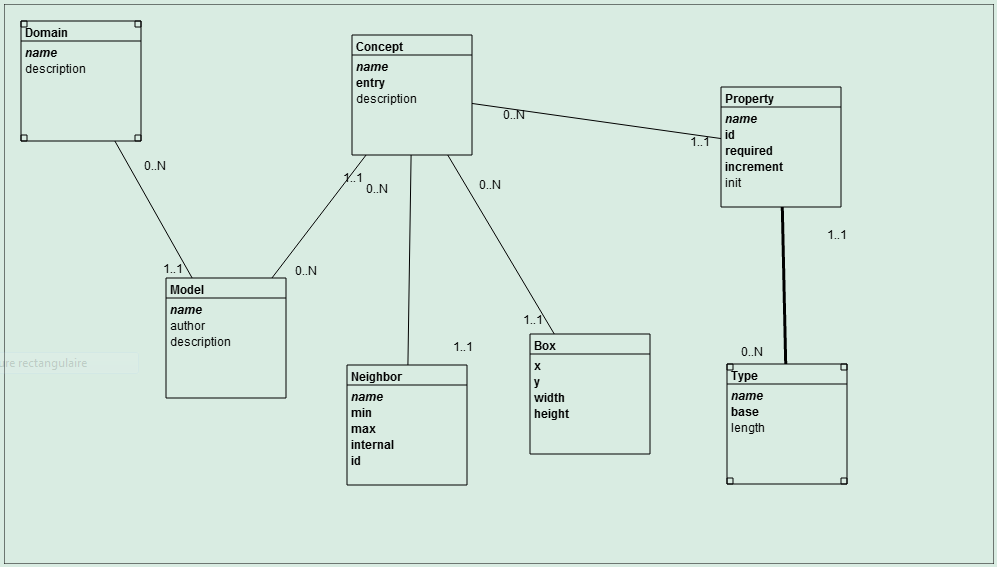 However, you cannot still save a model in a file.
Click the box tool to create a box, by clicking on an empty space in the board.
To move a non selected box, click the box and keep the mouse down while moving it. The connected lines will follow. A selected box cannot be moved.
Click the box to select it. Click again to deselect it. If there are several selected boxes (and/or lines), you may deselect them all by clicking on an empty space in the board. For the last selected box, its title (name) may be changed by entering text in the Box field. For the last selected box, an item may be added by entering its name in the Item box, then clicking on the Add button. The item is an attribute of the box. In addition, it may be declared as guid (globally unique identifier--not significant to a user), identifier (significant to a user) or required (mandatory value). The choice is presented in the pop-up list. An existing item may be obtained by entering its name and clicking on the Get button. The obtained item may be changed (Set button) or even removed (Remove button).
If you want to create several boxes, double-click the box tool to stay on. To return to the select mode double-click the select tool.
Click the line tool to create a line between the last two clicked boxes, by clicking on an empty space in the board. The first box is a parent and the second box is a child. By default, the parent box has 0..N cardinalities. The min is 0 and the max is N. By default, the child box has 1..1 cardinalities. An example is Department--0..N----1..1--Employee. A department has from 0 to N employees and an employee works for exactly one department. Currently, cardinalities cannot be changed.
Click the line, or very close to it, to select it. Click again to deselect it. If there are several selected lines (and/or boxes), you may deselect them all by clicking on an empty space in the board.
If you want to create several lines, double-click the line tool to stay on. To return to the select mode double-click the select tool.